BO Setup – API Key & Staff Access
Three short steps in your Back Office (BO). Takes about 5 minutes. When you finish each step, send us the details listed in the green box.
Create API key
Gives us read access to your platform so we can connect.
- 1
Go to BO. Click the ☰ burger menu (3 lines) at the top, then click MANAGE API.
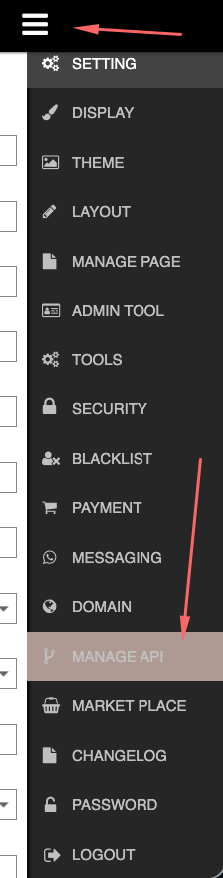 Screenshot: Burger menu → MANAGE API
 - 2
Click Add and fill in the form:
- Name:
SWIT - IP Address: get this from the person in charge
- Leave all Supported Modules ticked, then click SUBMIT
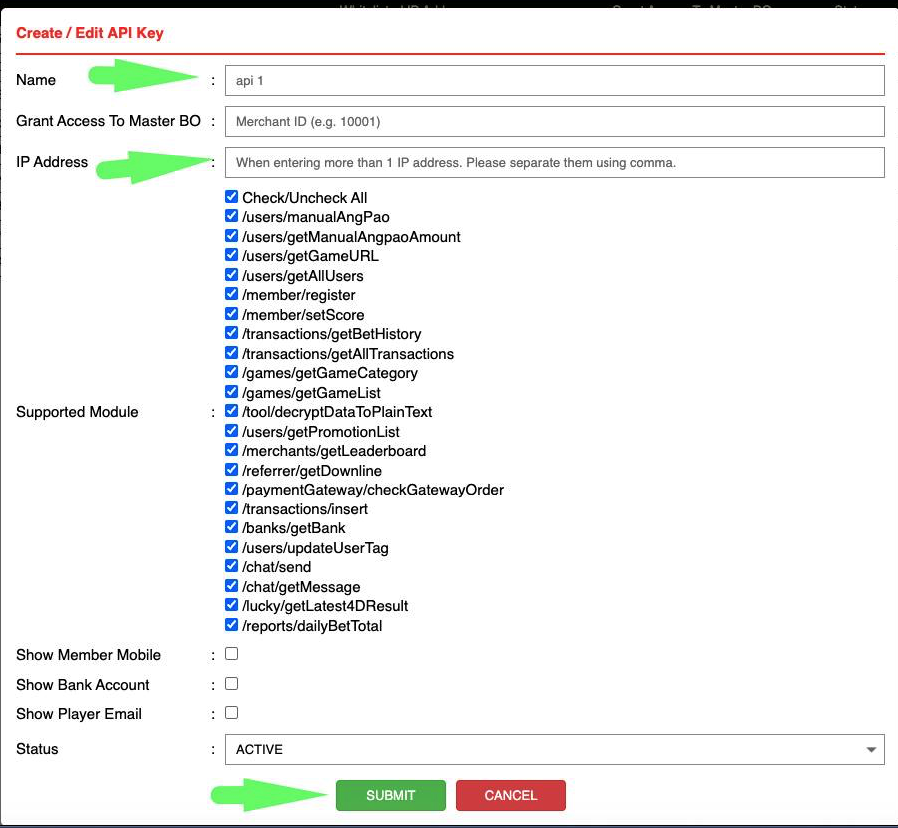 Screenshot: Create / Edit API Key form
 - Name:
- 3
The new record appears in the list. Copy the Access ID and Token.
 Screenshot: API record row (Access ID + Token)
- Access ID
- Token
Create staff access with limited menu
Sets up a role that can only see the menus we need.
- 1
Go to BO. Click the ☰ burger menu, then click SETTING.
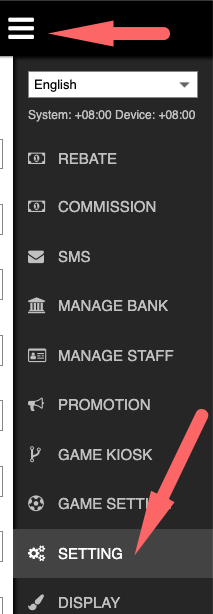 Screenshot: Burger menu → SETTING
 - 2
Click the Staff Access tab.
 Screenshot: Staff Access tab
 - 3
Pick any unused OTHER role (for example
OTHER1). Untick everything, then tick only these 5:- Promotion
- Display
- Layout
- Manage Page
- Tools
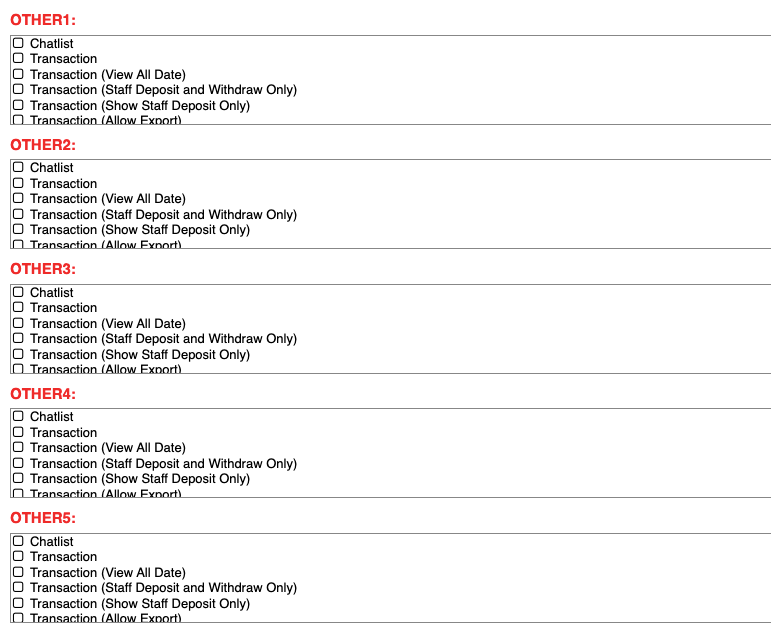 Screenshot: OTHER role permission lists
 - 4
Click Save.
Create staff login and password
Creates the account we will log in with, using the limited role from Step 2.
- 1
Go to BO. Click the ☰ burger menu, then click MANAGE STAFF.
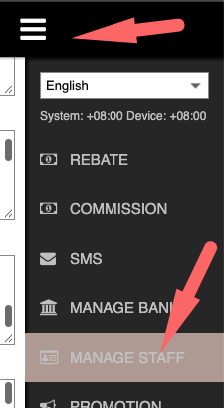 Screenshot: Burger menu → MANAGE STAFF
 - 2
In Role, select the OTHER role you set up in Step 2.
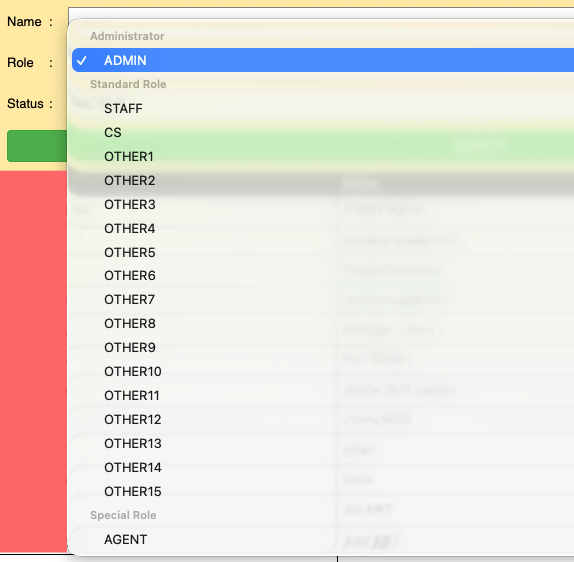 Screenshot: Role dropdown
 - 3
Click Create.
- 4
Fill in the details and click Save.
- BO link
- Username
- Password
- 2FA code
后台(BO)设置 – API 密钥 & 员工权限
在您的后台(BO)完成三个简单步骤,大约 5 分钟。每完成一步,请把绿色框里列出的资料发给我们。
创建 API 密钥
让我们可以连接到您的平台(只读权限)。
- 1
登录后台(BO)。点击顶部的 ☰ 菜单按钮(三条线),然后点击 MANAGE API。
截图:菜单 → MANAGE API - 2
点击 Add,然后填写表格:
- Name(名称):
SWIT - IP Address(IP 地址): 向负责人索取
- Supported Modules 全部保持勾选,然后点击 SUBMIT
截图:Create / Edit API Key 表格 - Name(名称):
- 3
列表中会出现新记录。复制 Access ID 和 Token。
截图:API 记录(Access ID + Token)
- Access ID
- Token
设置受限菜单的员工权限
设置一个只能看到我们所需菜单的角色。
- 1
登录后台(BO)。点击 ☰ 菜单按钮,然后点击 SETTING。
截图:菜单 → SETTING - 2
点击 Staff Access 标签页。
截图:Staff Access 标签页 - 3
选择任意一个未使用的 OTHER 角色(例如
OTHER1)。先取消全部勾选,然后只勾选以下 5 项:- Promotion
- Display
- Layout
- Manage Page
- Tools
截图:OTHER 角色权限列表 - 4
点击 Save。
创建员工账号和密码
使用第 2 步的受限角色,创建一个供我们登录的账号。
- 1
登录后台(BO)。点击 ☰ 菜单按钮,然后点击 MANAGE STAFF。
截图:菜单 → MANAGE STAFF - 2
在 Role 下拉框中,选择您在第 2 步设置的 OTHER 角色。
截图:Role 下拉框 - 3
点击 Create。
- 4
填写资料,然后点击 Save。
- 后台(BO)链接
- 用户名(Username)
- 密码(Password)
- 2FA 验证码