Getting Layan AI on your site
Three short steps. Step 1 connects your platform: about 2 minutes in your Back Office (BO) for JK brands, or a short spec for your IT team if you are on another platform. Steps 2 and 3 are what to prepare while we connect, so your go-live is not held up.
Create API key
Gives us read access to your platform so we can connect.
- 1
Go to BO. Click the ☰ burger menu (3 lines) at the top, then click MANAGE API.
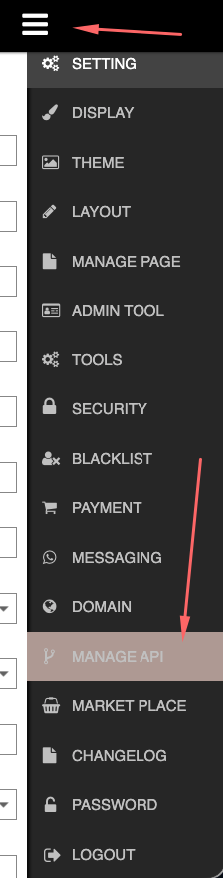 Screenshot: Burger menu → MANAGE API
- 2
Click Add and fill in the form:
- Name:
Layan IT - IP Address:
152.42.194.8(whitelist this IP) - Leave all Supported Modules ticked, then click SUBMIT
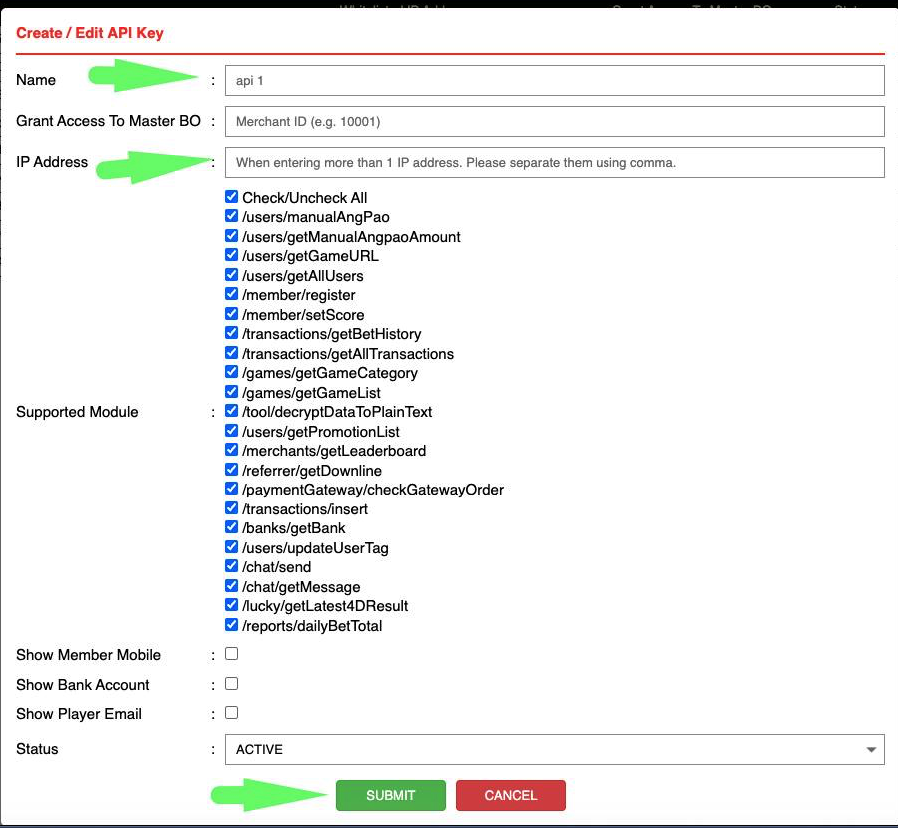 Screenshot: Create / Edit API Key form
- Name:
- 3
The new record appears in the list. Copy the Access ID and Token.
 Screenshot: API record row (Access ID + Token)
- Whitelist this IP:
152.42.194.8 - Access ID
- Token
- FE link (your player website)
- BO link
Send your data to Layan (Data Push API)
For brands that are not on the JK platform. Your platform pushes player and transaction data to us whenever it changes. We never call your platform and we never hold your API credentials. Hand this section to your IT team.
- 1
Endpoint and token. We issue a brand id and a push token for each website. Send the token in the header, never in the URL.
POST https://api.layan-ai.com/ingest/v1/<brand-id>
Authorization: Bearer <push-token>
Content-Type: application/json
If a token is ever exposed, tell us and we issue a replacement. Old and new both work during a short changeover.
- 2
Request format. Every request has the same shape: a
typeand adataarray of up to 500 records. Re-sending a record is safe: we match on its id and update instead of duplicating.{ "type": "transactions", "data": [ { ... }, { ... } ] } - 3
Feed
users– player records with current balance. Answers "what is my balance?".Field Type Notes userId string required Your unique player id. Must match the id used in transactions and on your website (step 8). balance number required Current main wallet balance, e.g. 125.50 currency string required MYR username string optional Login name, helps agents find the player name string optional Display name phone string optional Contact number vip string optional VIP level or tag registeredAt string optional ISO 8601 UTC updatedAt string required ISO 8601 UTC, e.g. 2026-09-11T03:20:00Z { "type": "users", "data": [ { "userId": "884213", "balance": 125.50, "currency": "MYR", "username": "ali88", "name": "Ali bin Ahmad", "phone": "60123456789", "vip": "Gold", "updatedAt": "2026-09-11T03:20:00Z" } ] } - 4
Feed
transactions– deposits, withdrawals and bonuses. This is the most important feed: most questions are about money that has not arrived yet.Field Type Notes txnId string required Unique transaction id, used to avoid duplicates userId string required Must match the id in users type string required deposit · withdrawal · bonus · rebate · adjustment amount number required e.g. 50.00 currency string required MYR method string optional Payment method or gateway name as the player sees it status string required pending · completed · rejected · cancelled remark string required if rejected Why it was rejected, in the words you want the player to read createdAt string required ISO 8601 UTC completedAt string optional When it settled or was rejected { "type": "transactions", "data": [ { "txnId": "TXN-99231", "userId": "884213", "type": "withdrawal", "amount": 300.00, "currency": "MYR", "method": "DuitNow", "status": "rejected", "remark": "Bank account name does not match. Please resubmit.", "createdAt": "2026-09-11T02:55:00Z", "completedAt": "2026-09-11T03:10:00Z" } ] }Why remark matters When a withdrawal is rejected we tell the player immediately, quoting your remark as the reason. A clear remark prevents an angry message to your support team. Never put a bank account number in it. - 5
Optional feeds. Not required to launch. Send them if you want the assistant to answer these questions too.
type Enables Key fields registrations Welcoming new players, first-deposit prompts userId, registeredAt, referrerId downline "How many people did I refer?" userId, downlineUserId, level, joinedAt dailyBetTotal "How much have I wagered?", turnover progress userId, date, totalBet, totalWin promotions Current bonus list without manual updates promoId, title, type, amount, turnover, validFrom, validTo - 6
How often to push. The assistant is only as current as your most recent push.
Feed Recommended Minimum acceptable transactions Immediately on every status change Every 60 seconds users On balance change, or every 1–2 min Every 5 minutes registrations On signup Hourly downline, dailyBetTotal, promotions Hourly Daily This one decision decides whether players trust the assistant The most common question is "my deposit hasn't arrived". If transactions are pushed every 5 minutes, a player who deposited 30 seconds ago is told there is no deposit, and contacts your support team anyway. Push each transaction the moment its status changes. - 7
Responses and retries. Keep a queue and remove a record only after a
200.Code Meaning What to do 200 Accepted, body shows how many records were stored Nothing 400 Malformed JSON or a missing required field Fix and resend, do not retry unchanged 401 Token missing, wrong or revoked Contact us 429 Too many requests Wait, then retry 5xx Our problem Retry with backoff (1s, 5s, 30s) HTTP/1.1 200 OK { "ok": true, "type": "transactions", "accepted": 2, "rejected": 0 } - 8
Your website must tell us who is chatting. We send one line of code for your site (Step 3, item 6). Before it, your page template sets the logged-in player's id, the same
userIdyou push. Leave it empty when nobody is logged in.<script>window.LayanAI = { userId: "884213" };</script> /* value from your server-side template */ - 9
What we do not want. Passwords or hashes, full bank account or card numbers, identity documents or KYC images, players who never used your website. If a field is not on this page, we do not want it.
- How many websites you are connecting (we issue a brand id and push token for each)
- FE link (your player website)
- Your IT contact for the test push
- The userId of one test player with a recent deposit and withdrawal
- Tell us when the first test records are sent. We confirm they arrived, then you switch on the full feed.
Set up your AI accounts
The AI that answers your players runs on your own AI provider account, so the provider bills the usage directly to you. Layan's monthly fee is separate and does not include AI usage.
- 1
Anthropic (Claude) – required. This is the main AI that answers every chat.
- Create an account at console.anthropic.com using a company email.
- Go to Settings → Billing, add a credit card and buy starting credit (we suggest about USD 100 to begin; turn on auto-reload so the AI never stops mid-month).
- Go to Settings → API keys → Create Key. Name it
Layan. Copy the key – it starts withsk-ant-and is shown only once.
- 2
OpenAI (ChatGPT) – recommended backup. Used only if Claude is unreachable, so your players still get answers. The cost is small.
- Create an account at platform.openai.com.
- Go to Settings → Billing, add a card and a small balance (about USD 20).
- Go to API keys → Create new secret key. Name it
Layan. Copy the key – it starts withsk-.
- 3
Paste the keys into your Layan dashboard – not into the group chat.
- Log in at app.layan-ai.com with the owner login we send you.
- Open 💳 Billing → Your AI accounts, paste each key and press Connect.
- The dashboard checks the key with the provider on the spot. If it says the key was rejected, check for missing characters or that the card/credit was added.
- During free testing we use our own AI account – you only need the keys before go-live.
- Keep a payment card on both accounts. If your balance runs out, we keep answering on our account for a while and tell you, but please top up quickly.
- You can see your spending any time in the provider's console (Usage page).
Prepare your brand details
What we need from you to make the AI sound like your brand and answer correctly from day one. Send these in the group chat (files are fine).
- 1
Brand look. Brand name as players know it, logo (PNG, transparent if possible), main brand colour, and the languages your players use (e.g. English, Bahasa Malaysia, 中文).
- 2
Deposit and withdrawal info. The methods you offer (bank transfer, e-wallet, crypto…), minimum and maximum amounts, usual processing times, and what a player should do when a deposit is delayed. This is the most-asked topic in every chat.
- 3
Promotions. Your current bonuses with their full terms (turnover requirement, max withdrawal, eligible games, expiry). Send the T&C page link or a file. Tell us whenever a promotion changes.
- 4
Your existing Q&A. Any FAQ page, customer-service scripts, or canned replies your team uses today. Even a WhatsApp export of common questions helps – we turn it into the AI's knowledge.
- 5
A test player account. Username and password of a real test player on your site with a small balance, so we can check that the AI reads balances, deposits and withdrawals correctly before any real player uses it.
- 6
Your website developer. We send one line of code. Whoever manages your website pastes it once before
</body>on every page, and the chat bubble appears. Have that person ready in the group.
- Step 1 details sent (IP whitelisted, Access ID, Token, FE + BO links)
- Step 1 done (brand id + push token issued, test records received, full feed switched on, website sets userId)
- Anthropic key connected in the dashboard (OpenAI key optional)
- Logo, colour, languages sent
- Deposit / withdrawal info and current promotions sent
- Existing FAQ or CS scripts sent
- Test player account sent
- Website code pasted by your developer
- First payment made from the dashboard (setup fee + first month)
在您的网站接入 Layan AI
三个简单步骤。第 1 步是连接您的平台:JK 平台品牌在后台(BO)约 2 分钟完成;其他平台则把一份简短的技术说明交给您的技术团队。第 2、3 步是在我们接入期间您需要准备的事项,以免上线被耽误。
创建 API 密钥
让我们可以连接到您的平台(只读权限)。
- 1
登录后台(BO)。点击顶部的 ☰ 菜单按钮(三条线),然后点击 MANAGE API。
截图:菜单 → MANAGE API - 2
点击 Add,然后填写表格:
- Name(名称):
Layan IT - IP Address(IP 地址):
152.42.194.8(请把此 IP 加入白名单) - Supported Modules 全部保持勾选,然后点击 SUBMIT
截图:Create / Edit API Key 表格 - Name(名称):
- 3
列表中会出现新记录。复制 Access ID 和 Token。
截图:API 记录(Access ID + Token)
- 把此 IP 加入白名单:
152.42.194.8 - Access ID
- Token
- FE 链接(前台 / 玩家网站)
- BO 链接(后台)
把数据推送给 Layan(Data Push API)
适用于不在 JK 平台的品牌。您的平台在数据变动时把玩家和交易数据推送给我们。我们不会调用您的平台,也不保存您的 API 凭证。请把本节交给您的技术团队。
- 1
接口与令牌。 我们为每个网站发放一个 brand id 和一个 push token。令牌放在请求头,不要放在 URL 里。
POST https://api.layan-ai.com/ingest/v1/<brand-id>
Authorization: Bearer <push-token>
Content-Type: application/json
令牌若泄露,请告诉我们,我们会立即发放新令牌。切换期间新旧令牌同时有效。
- 2
请求格式。 每个请求结构相同:一个
type和一个data数组,每次最多 500 条。重复发送同一条记录是安全的:我们按 id 匹配并更新,不会重复。{ "type": "transactions", "data": [ { ... }, { ... } ] } - 3
数据类型
users– 玩家资料及当前余额。用于回答“我的余额是多少?”。字段 类型 说明 userId string 必填 您的玩家唯一 id。必须与交易记录和网站代码(第 8 步)中的 id 一致。 balance number 必填 当前主钱包余额,例如 125.50 currency string 必填 MYR username string 可选 登录名,方便客服查找玩家 name string 可选 显示名称 phone string 可选 联系电话 vip string 可选 VIP 等级或标签 registeredAt string 可选 ISO 8601 UTC updatedAt string 必填 ISO 8601 UTC,例如 2026-09-11T03:20:00Z { "type": "users", "data": [ { "userId": "884213", "balance": 125.50, "currency": "MYR", "username": "ali88", "name": "Ali bin Ahmad", "phone": "60123456789", "vip": "Gold", "updatedAt": "2026-09-11T03:20:00Z" } ] } - 4
数据类型
transactions– 存款、提款和红利。这是最重要的数据:大多数问题都是关于还没到账的钱。字段 类型 说明 txnId string 必填 交易唯一 id,用于去重 userId string 必填 必须与 users 中的 id 一致 type string 必填 deposit · withdrawal · bonus · rebate · adjustment amount number 必填 例如 50.00 currency string 必填 MYR method string 可选 玩家看到的支付方式或通道名称 status string 必填 pending · completed · rejected · cancelled remark string 被拒时必填 拒绝原因,用您希望玩家读到的措辞 createdAt string 必填 ISO 8601 UTC completedAt string 可选 到账或被拒的时间 { "type": "transactions", "data": [ { "txnId": "TXN-99231", "userId": "884213", "type": "withdrawal", "amount": 300.00, "currency": "MYR", "method": "DuitNow", "status": "rejected", "remark": "Bank account name does not match. Please resubmit.", "createdAt": "2026-09-11T02:55:00Z", "completedAt": "2026-09-11T03:10:00Z" } ] }为什么 remark 很重要 提款被拒时,我们会立即通知玩家,并引用您的 remark 作为原因。清楚的说明能避免玩家生气地找客服。remark 里绝不要包含银行账号。 - 5
可选数据。 上线不需要。如果您希望 AI 也能回答这些问题,再发送。
type 可回答 主要字段 registrations 欢迎新玩家、首存提醒 userId, registeredAt, referrerId downline “我推荐了多少人?” userId, downlineUserId, level, joinedAt dailyBetTotal “我投注了多少?”、流水进度 userId, date, totalBet, totalWin promotions 当前优惠列表,无需手动更新 promoId, title, type, amount, turnover, validFrom, validTo - 6
推送频率。 AI 的数据只会和您最近一次推送一样新。
数据 建议 最低要求 transactions 每次状态变更时立即推送 每 60 秒 users 余额变动时,或每 1–2 分钟 每 5 分钟 registrations 注册时 每小时 downline, dailyBetTotal, promotions 每小时 每天 这一个决定直接影响玩家是否信任 AI 最常见的问题是“我的存款还没到”。如果交易每 5 分钟才推送一次,30 秒前存款的玩家会被告知没有存款记录,然后还是会去找客服。请在每笔交易状态变更的那一刻推送。 - 7
响应与重试。 保留一个队列,收到
200后才移除记录。状态码 含义 处理 200 已接收,响应里显示保存了多少条 无需处理 400 JSON 格式错误或缺少必填字段 修正后重发,不要原样重试 401 令牌缺失、错误或已撤销 联系我们 429 请求太多 稍等后重试 5xx 我们这边的问题 退避重试(1 秒、5 秒、30 秒) HTTP/1.1 200 OK { "ok": true, "type": "transactions", "accepted": 2, "rejected": 0 } - 8
您的网站要告诉我们是谁在聊天。 我们会发一行网站代码(第 3 步第 6 项)。在它前面,您的页面模板需要写入当前登录玩家的 id,必须与推送的
userId相同。未登录时留空。<script>window.LayanAI = { userId: "884213" };</script> /* 由服务器端模板填入 */ - 9
不要发送的内容。 密码或密码哈希、完整银行账号或卡号、身份证件或 KYC 图片、从未使用您网站的玩家。本页没有列出的字段,我们都不需要。
- 要接入几个网站(每个网站发放一个 brand id 和 push token)
- FE 链接(玩家网站)
- 负责测试推送的技术联系人
- 一个测试玩家的 userId,近期有存款和提款记录
- 发送第一批测试记录时告诉我们。我们确认收到后,您再开启完整推送。
开通您的 AI 账户
回答玩家的 AI 使用的是您自己的 AI 服务商账户,用量由服务商直接向您收费。Layan 的月费是另外计算的,不包含 AI 用量。
- 1
Anthropic(Claude)– 必须。 这是回答每一条聊天的主 AI。
- 用公司邮箱在 console.anthropic.com 注册账户。
- 进入 Settings → Billing,绑定信用卡并购买初始额度(建议先充 USD 100 左右,并开启自动充值,避免 AI 在月中停机)。
- 进入 Settings → API keys → Create Key,名称填
Layan。复制密钥——以sk-ant-开头,只显示一次。
- 2
OpenAI(ChatGPT)– 建议开通,作为备用。 只有在 Claude 无法连接时才会使用,确保玩家始终有人回答。费用很低。
- 在 platform.openai.com 注册账户。
- 进入 Settings → Billing,绑定信用卡并充值少量余额(约 USD 20)。
- 进入 API keys → Create new secret key,名称填
Layan。复制密钥——以sk-开头。
- 3
把密钥粘贴到您的 Layan 后台——不要发到群聊。
- 用我们发给您的管理员(owner)登录账号登录 app.layan-ai.com。
- 打开 💳 Billing → Your AI accounts,粘贴每个密钥并点击 Connect。
- 系统会当场向服务商验证密钥。如果提示密钥被拒绝,请检查是否少复制了字符,或是否已绑定信用卡 / 充值。
- 免费测试期间我们使用自己的 AI 账户——您只需在正式上线前准备好密钥。
- 两个账户都请保持绑定有效的付款卡。余额用完时,我们会暂时用自己的账户继续回答并通知您,但请尽快充值。
- 随时可以在服务商控制台的 Usage 页面查看用量和花费。
准备品牌资料
以下资料让 AI 从第一天起就像您的品牌一样说话、并回答正确。请在群聊发给我们(文件也可以)。
- 1
品牌形象。 玩家熟悉的品牌名称、Logo(PNG,最好透明底)、品牌主色,以及玩家使用的语言(例如英文、马来文、中文)。
- 2
存款与提款资料。 您提供的方式(银行转账、电子钱包、加密货币等)、最低 / 最高金额、通常处理时间,以及存款延迟时玩家该怎么做。这是每个聊天里问得最多的话题。
- 3
优惠活动。 当前的优惠及完整条款(流水要求、最高提款、适用游戏、有效期)。发条款页面链接或文件即可。优惠有变动时请随时告诉我们。
- 4
您现有的问答。 任何 FAQ 页面、客服话术或常用回复。即使是常见问题的 WhatsApp 导出也有帮助——我们会把它变成 AI 的知识库。
- 5
一个测试玩家账号。 您网站上一个真实测试玩家的用户名和密码,并有少量余额,让我们在真实玩家使用前确认 AI 能正确读取余额、存款和提款。
- 6
您的网站开发人员。 我们会发一行代码,由管理您网站的人在每个页面的
</body>前粘贴一次,聊天气泡就会出现。请让这个人也在群里。
- 第 1 步资料已发送(IP 已加白名单、Access ID、Token、FE + BO 链接)
- 第 1 步已完成(已发放 brand id + push token、测试记录已收到、完整推送已开启、网站已设置 userId)
- Anthropic 密钥已在后台连接(OpenAI 密钥可选)
- Logo、品牌色、语言已发送
- 存款 / 提款资料和当前优惠已发送
- 现有 FAQ 或客服话术已发送
- 测试玩家账号已发送
- 网站代码已由开发人员粘贴
- 已从后台完成首次付款(开通费 + 首月费)